Measure baggage tool
Forget the tape, use your phone instead!



Project Overview
Project Overview
Project Overview
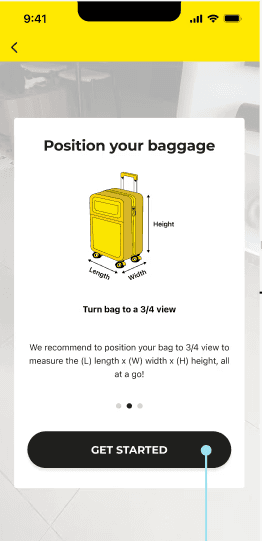
An AR baggage measurement feature was initiated by Scoot's UX Team for Scoot's mobile app so that we can enable our users to check their bag's exact measurements (length, width and height). This is so that they know whether it can be carried on a flight as a carry-on, or if it needs to be checked for a smooth check-in experience.
An AR baggage measurement feature was initiated by Scoot's UX Team for Scoot's mobile app so that we can enable our users to check their bag's exact measurements (length, width and height). This is so that they know whether it can be carried on a flight as a carry-on, or if it needs to be checked for a smooth check-in experience.
Problem
Problem
Passengers often struggle to know if their luggage meets carry-on size limits, causing stress, delays, and unexpected fees. This uncertainty disrupts check-in for both travelers and airline staff.
Passengers often struggle to know if their luggage meets carry-on size limits, causing stress, delays, and unexpected fees. This uncertainty disrupts check-in for both travelers and airline staff.
Solution
Solution
Design an AR baggage measurement tool in Scoot’s app that lets passengers measure luggage dimensions using their smartphone camera. The feature provides instant feedback on carry-on eligibility, making check-in smoother.
Design an AR baggage measurement tool in Scoot’s app that lets passengers measure luggage dimensions using their smartphone camera. The feature provides instant feedback on carry-on eligibility, making check-in smoother.
Process
Process
Process
User Survey
User Survey
A survey was conducted with passengers using the AR baggage tool to gather feedback on measurement accuracy, ease of use, and overall impact. Insights were used to refine the tool and better meet user needs.
A survey was conducted with passengers using the AR baggage tool to gather feedback on measurement accuracy, ease of use, and overall impact. Insights were used to refine the tool and better meet user needs.
User Interviews
User Interviews
Interviews were conducted at Changi Airport's boarding gate area to focus on how passengers interacted with the tool, its usability, and any challenges faced. This qualitative feedback guided improvements to enhance the travel experience.
Interviews were conducted at Changi Airport's boarding gate area to focus on how passengers interacted with the tool, its usability, and any challenges faced. This qualitative feedback guided improvements to enhance the travel experience.
UX Research Synthesis
UX Research Synthesis
Survey and interview insights were synthesized to identify key user needs, pain points, and expectations. Competitor analysis was also conducted to ensure the tool stood out.
Survey and interview insights were synthesized to identify key user needs, pain points, and expectations. Competitor analysis was also conducted to ensure the tool stood out.
Design Implementation
Design Implementation
Afterwards, we set clear objectives for the design, determining where and how users will access the tool, and creating wireframes to visualize the layout and functionality. This process ensures that the design meets user needs and integrates smoothly into the overall user experience.
Afterwards, we set clear objectives for the design, determining where and how users will access the tool, and creating wireframes to visualize the layout and functionality. This process ensures that the design meets user needs and integrates smoothly into the overall user experience.
User Survey
User Survey
User Survey

What we gathered from the User Survey:
What we gathered from the User Survey:
Demand
Demand
Almost half of respondents do not measure / check as they do not carry oversized bags.
Top items carried on board are electronic devices (laptop/tablet) and delicate items such as souvenirs and food
There is a low frequency of them bringing odd-sized items due to the nature of travel (mostly vacation)
Almost half of respondents do not measure / check as they do not carry oversized bags.
Top items carried on board are electronic devices (laptop/tablet) and delicate items such as souvenirs and food
There is a low frequency of them bringing odd-sized items due to the nature of travel (mostly vacation)
Awareness
Awareness
Major of respondents were not aware of a measuring AR tool
Users who owns app may not be aware that there is such tool as it is nested under "More > Travel tool"
Major of respondents were not aware of a measuring AR tool
Users who owns app may not be aware that there is such tool as it is nested under "More > Travel tool"
Behaviour
Behaviour
4/5 users feedback that they carry 'proven' safe to carry-on bag choices based on experience
Respondents rely on traditional method of searching for information when in doubt for trip preparation
4/5 users feedback that they carry 'proven' safe to carry-on bag choices based on experience
Respondents rely on traditional method of searching for information when in doubt for trip preparation
User Interviews
User Interviews
User Interviews
Users are put to 2 tasks with a task-scenario briefed as they interact with the tool for a comparison on the user experience:
1) Singapore Airlines App (Scanning) 2) App store measuring tool (Point-To-Point)
What we wanted to test or validate:
UX between 2 concepts (Scanning VS Point-To-Point)
Users likes and motivation in the process
Pain points (What to avoid when designing)
Users are put to 2 tasks with a task-scenario briefed as they interact with the tool for a comparison on the user experience:
1) Singapore Airlines App (Scanning)
2) App store measuring tool (Point-To-Point)
What we wanted to test or validate:
UX between 2 concepts (Scanning VS Point-To-Point)
Users likes and motivation in the process
Pain points (What to avoid when designing)
Speaking to travelers at Changi Airport
Speaking to travelers at Changi Airport


UX Research Synthesis
1) Competitor's Analysis: AR Scan Mapping Tool VS Point-to-Point Measuring Tool
While both tools effectively measure baggage, the AR tool struggles with ease of use and requires more effort from users, though it offers reliable results and clear visual aids. In contrast, the Point-to-Point tool is user-friendly with lower effort but has some accuracy issues.
1) Competitor's Analysis: AR Scan Mapping Tool VS Point-to-Point Measuring Tool
While both tools effectively measure baggage, the AR tool struggles with ease of use and requires more effort from users, though it offers reliable results and clear visual aids. In contrast, the Point-to-Point tool is user-friendly with lower effort but has some accuracy issues.

2) Users Pain Points and Preferences;
Most users preferred the scanning feature because it eliminated tapping and made the experience more seamless. Pain points included lack of guidance, measurement inaccuracies, and text visibility issues.
Despite user preference for scanning due to its ease of use, the team chose the point-to-point measuring tool for key reasons:
Accuracy: The scanning feature was intuitive but less reliable in different environments. The point-to-point tool offered precise measurements, helping users confidently check baggage size.
Consistency: The point-to-point tool worked well across various contexts, reducing errors and improving overall reliability.
Balancing user preference with practical considerations is common in UX. Prioritizing the point-to-point tool was a strategic choice to ensure effectiveness and reliability.
2) Users Pain Points and Preferences;
Most users preferred the scanning feature because it eliminated tapping and made the experience more seamless. Pain points included lack of guidance, measurement inaccuracies, and text visibility issues.
Despite user preference for scanning due to its ease of use, the team chose the point-to-point measuring tool for key reasons:
Accuracy: The scanning feature was intuitive but less reliable in different environments. The point-to-point tool offered precise measurements, helping users confidently check baggage size.
Consistency: The point-to-point tool worked well across various contexts, reducing errors and improving overall reliability.
Balancing user preference with practical considerations is common in UX. Prioritizing the point-to-point tool was a strategic choice to ensure effectiveness and reliability.


3) What was important to users?
This analysis ranks the features travelers value most in a baggage measurement tool or app. "Ease of Use" tops the list as the most critical factor, with users preferring tools that require minimal effort or steps. Following closely is the need for "Progress Updates" that clearly indicate whether the bag meets size requirements. "Guided Instructions" are also highly valued, ensuring users know what to do next. Lower on the priority list are "Quick to Use" and "Clarity of Information," although they still play a role in the overall user experience.
3) What was important to users?
This analysis ranks the features travelers value most in a baggage measurement tool or app. "Ease of Use" tops the list as the most critical factor, with users preferring tools that require minimal effort or steps.
Following closely is the need for "Progress Updates" that clearly indicate whether the bag meets size requirements. "Guided Instructions" are also highly valued, ensuring users know what to do next. Lower on the priority list are "Quick to Use" and "Clarity of Information," although they still play a role in the overall user experience.

Design Goals
From our UX research on feedback and behaviours, we summarised the key goals that the design mock ups should deliver:
Providing assuring updates/progress to guide users with steps while executing the steps
Use easy to identify words and description or quick images to prompt
Help users check their input to requirement
Clear instructions to prepare users (demo or images) before they start to tap instead of leaving them to guesswork
From our UX research on feedback and behaviours, we summarised the key goals that the design mock ups should deliver:
Providing assuring updates/progress to guide users with steps while executing the steps
Use easy to identify words and description or quick images to prompt
Help users check their input to requirement
Clear instructions to prepare users (demo or images) before they start to tap instead of leaving them to guesswork
Designing Entry Point(s)
Placed in the Self-help or Tool sections (via category)
It needs to be weaved into users post-booking flow (align with users behavioral patterns)
Present itself at highly noticeable places for users to pick up in order to use it and benefit from it
Placed in the Self-help or Tool sections (via category)
It needs to be weaved into users post-booking flow (align with users behavioral patterns)
Present itself at highly noticeable places for users to pick up in order to use it and benefit from it
Thank you for reading my case study!
Let's connect!
Let's connect!
Let's connect!